This page provides instructions on how to use our IR Website.
About Navigation
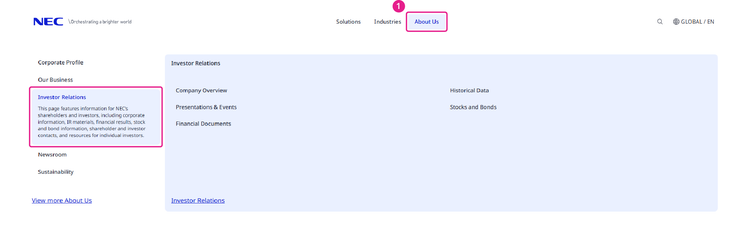
1. Clicking "About NEC" at the top of the site will display all categories of the "Investor Relations" site. You can then navigate to each category.
2. Breadcrumb Navigation
This indicates your current location on the site.
Clicking each item will take you to that respective page.

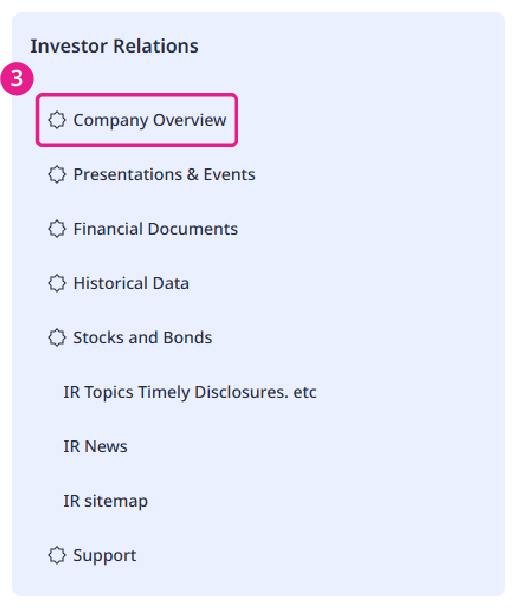
3. Site Navigation
This section displays the categories and page names within the "Investor Relations" site.
Clicking a category name will display its associated detailed pages below. Click on these pages to navigate to them.
About Language Switch
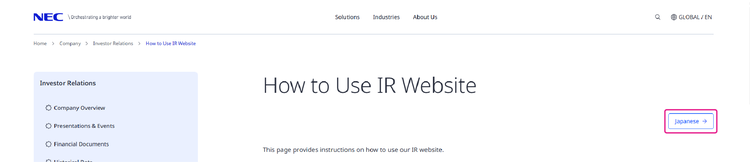
To switch to the English site, please click the "English" link located at the top right of the screen, next to the page title.
About the PDF Icon
To view documents marked with this icon, Adobe Reader is required.
If Adobe Reader is not installed, please download it from the URL below.
For Viewing the Latest Information
If your browser retains cached data (temporary internet files) from a previous visit to this website, the latest information may not correctly displayed.
To ensure you see the latest information, please press "Ctrl" and "F5" keys simultaneously on your keyboard to refresh the page.
Site Map
The Site Map shows all of the contents of IR site.
The gate pages below explain the outlines of the contents.
Company Overview
Presentations & Events
Financial Documents
Historical Data
Stocks and Bonds