
NECサイバーセキュリティ技術統括部セキュリティ技術センターの油布です。
本記事では、Elasticが提供しているAI Assistant[1]の機能について紹介します。
また、過去に記載したブログ「Elastic Securityを触ってみた」[2]でElastic Securityの機能を紹介しており、本記事と同様の攻撃シナリオとなっておりますので、併せてご覧ください。
※注意: 本機能は開発中であるため、本番環境でご利用される際にはご注意ください。サポート対象外の場合がございます。
※注意: 本ブログの情報を用いた設定は、必ず自らの責任によって行ってください。本ブログの内容を使用したことによって発生したインシデントについて、筆者および関係者はいかなる責任も負いません。
Elastic AI Assistantとは
Elastic AI Assistantは、生成AIを活用してアラート調査、インシデント対応、クエリ生成、自然言語による会話など、Elastic Securityでの調査を強化します。
例えば、次のようなユースケースでの利用が想定されます。
- アラートのトリアージ:アラートに関する解釈の支援
- 脅威の特定、調査、文書化:脅威の特定や分析、レポートの生成の支援
- ES|QLクエリの生成:Elasticsearchクエリ言語 (ES|QL)のカスタマイズの支援
- 自動インポート:Elasticへのインポートがされていないソースからのデータを素早く解析して取り込み、ECSマッピングを作成する支援
- 自動クエリ変換:Splunkの検索処理言語(SPL)からElasticsearchクエリ言語(ES|QL)へのSIEMルールの迅速な変換の支援
他にも様々な機能があります。機能の詳細をお知りになりたい方は、Elastic社が公開しているドキュメント[3]をご確認下さい。
なお、Elastic AI Assistant機能を利用する場合、Enterprise subscriptionが必要です。
検証環境とセットアップ
検証用に用意した環境と、Elastic AI Assistantのセットアップについて紹介します。
検証環境について
本検証は、以下の環境で行いました。Elastic stackの環境は、The Elastic Container Project[4]を用いてコンテナ化されたElastic stack環境を構築しています。また、検証環境内のドメインであるriht.localの各マシンにはElastic Agent[5]を導入しています。
- Elastic Stack(Elasticsearch、Kibana、Fleet Server)
- OS:Ubuntu 22.04.4 LTS
- Active Directoryサーバ
- OS:Windows Server 2022 Standard Evaluation 21H2
- クライアント端末
- Windows 11 Pro 24H2
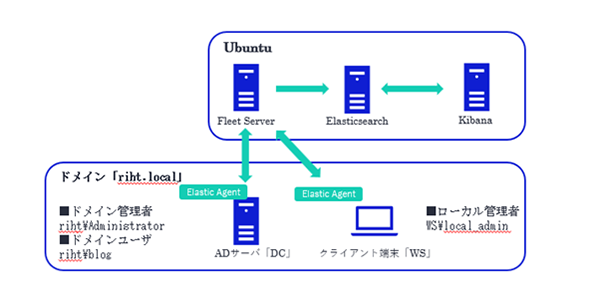
The Elastic Container Projectのデプロイや、Elastic Agentのインストール方法などの構築手順については各サイト[6][7]をご参照ください。
Elastic AI Assistantのセットアップについて
Elastic AI AssistantをKibana上でセットアップします。
Elastic AI Assistantでは、大規模言語モデル(以下、LLM)[8]を利用しています。
LLMはAzure OpenAI[9]などのサードパーティのLLMやローカルLLMなどを利用することができます。
本検証では、Azure OpenAI[9]にてgpt-4oを利用します。
Azure OpenAIの作成手順に関しては、公式ドキュメント[10]をご参照ください。
設定したパラメータについては、次に記載します。
Azure OpenAIリソース作成のパラメータ
-
基本
- サブスクリプション:(任意)
- リソースグループ:(任意)
- リージョン:Japan East
- 名前:(任意)
- 価格レベル:Standard S0
-
ネットワーク
- 種類:インターネットを含むすべてのネットワークがこのリソースにアクセスできます。
-
Tags
- 名前:(任意)
- 値:(任意)
- リソース:(任意)
作成が完了しましたら、Azure OpenAI、Azure AI Foundryポータルで次の画面が表示されます。
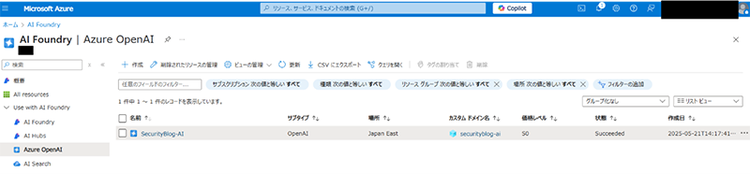
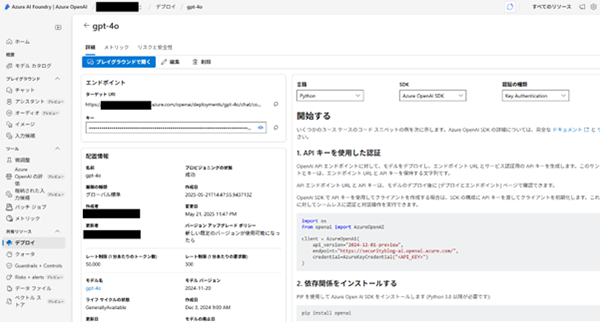
次にKibana上で作成したAzure OpenAIを連携させていきます。
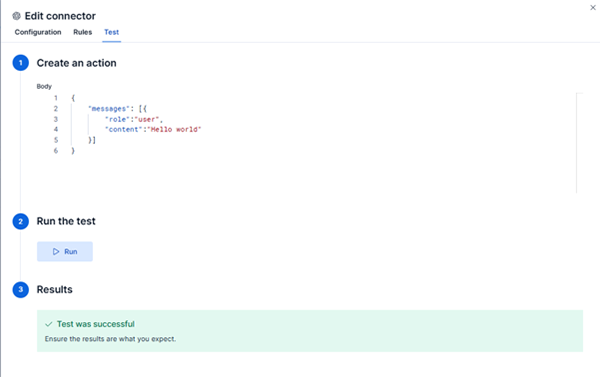
KibanaでAzure OpenAIコネクタを利用してElastic AI Assistantを構成する手順は公式ドキュメント[11]をご参照ください。
連携が成功した場合は、Resultsで「Test was successful」と表示されます。
攻撃シナリオ
検証環境に対して、以下の攻撃シナリオを実施しました。
本シナリオで登場する架空の人物「佐藤さん」は、クライアント端末「WS」の正規の利用者です。今回の攻撃シナリオでは、佐藤さんが内部不正を実施します。
- 佐藤さんが「WS」に対してローカル管理者「WS\local_admin」の権限でログオン
- Downloads フォルダをWindows Defenderの除外リストに追加した後、Edgeから資格情報窃取ツールMimikatz[12]をダウンロード
- Mimikatzで「**event::clear**」を実行してイベントログを削除
Elastic AI Assistantを利用した調査
調査したいアラートの「Analyze Event」、「AI Assistant」を順にクリックすると、「⊕Alert(from summary)」が選択できるようになります。
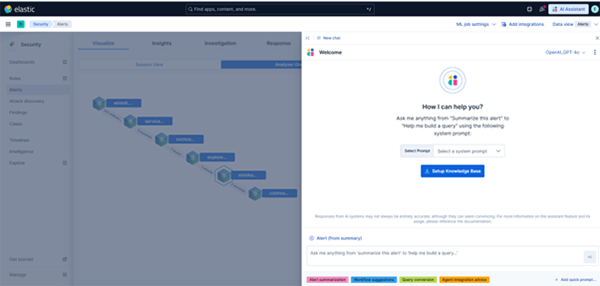
この画面にて「Alert Summarization」をクリックすることで、アラートの概要について回答してもらうプロンプトが表示されます。
アラートの概要について回答してもらうプロンプト文
As an expert in security operations and incident response, provide a breakdown of the attached alert and summarize what it might mean for my organization.
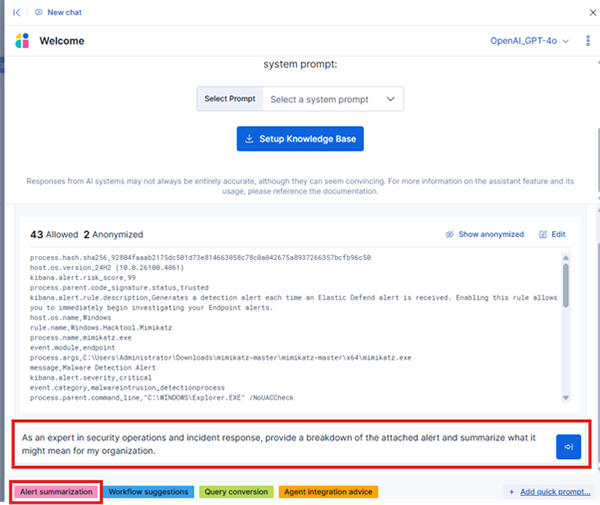
Elastic AI Assistantから、以下のようにアラートの概要について回答されます。
回答されたアラートの概要
Breakdown of the Alert
-
Timestamp and Alert ID:
- @timestamp: 2025-05-22T12:56:51.151Z indicates when the alert was generated.
- _id: 5be3a10f3c5e6447e690b7b7fb87be06c89ea983f2300afd4b7dba73057b3504 is the unique identifier for this alert.
(中略)
Summary and Implications
This alert indicates that the tool Mimikatz, a well-known credential theft utility, was executed on a Windows host (blog-win). The tool is often used by attackers to extract credentials from memory, escalate privileges, or perform lateral movement within an environment.
Key Concerns:
-
Critical Severity:
- The alert is marked as critical with a risk score of 99, suggesting immediate attention is required.
-
Execution Context:
- The process was executed under a high integrity level, which could allow it to access sensitive system resources.
- The parent process (explorer.exe) was trusted, indicating potential abuse of legitimate processes.
-
Potential Threat:
- Even though the file is signed and marked as trusted, the presence of Mimikatz is highly suspicious and indicative of malicious activity.
Recommendations:
-
Immediate Containment:
- Isolate the affected host to prevent further compromise.
- Terminate the suspicious process (mimikatz.exe).
-
Investigation:
- Analyze the origin of the file (C:\Users\Administrator\Downloads\mimikatz-master\mimikatz-master\x64\mimikatz.exe) and determine how it was downloaded.
- Review logs for signs of credential theft or lateral movement.
-
Remediation:
- Reset credentials for any accounts that may have been exposed.
- Patch and update the affected system to mitigate vulnerabilities.
-
Proactive Measures:
- Implement stricter endpoint monitoring and block execution of known hacking tools like Mimikatz.
- Educate users about phishing and downloading suspicious files.
This alert signifies a potentially serious security incident that could compromise your organization's network if not addressed promptly.
アラートの概要や懸念事項、対応の推奨事項や事前対策などについて回答してくれます。
「Summary and Implications」ではMimikatzがWindows上で実行されたこと、Mimikatzのツール内容について記載があり、「Key Concerns」では、Mimikatzの前後のプロセスの中身も考慮して不審であるかの見解を回答しています。
アラートの内容を詳細に記載されているわけではないですが、大まかな内容把握には便利であると考えております。
Attack discovery
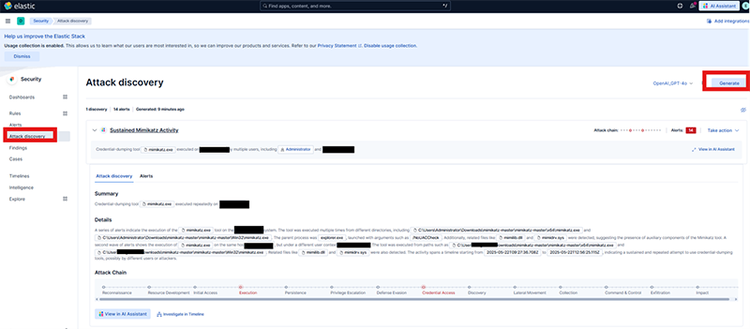
「Attack discovery」は環境内のアラートを分析し、脅威を特定する機能です。複数のアラート間の関係性を説明することで、どのユーザとホストが関与しているか、アラートがMITRE ATT&CKマトリックスとどのように対応しているか、そしてどの脅威アクターが関与しているかを把握することができます[13]。
本機能はSecurityの「Attack discovery」で利用できます。
「Generate」をクリックすることで、LLMがサマリや詳細、Attack Chainなどを回答してくれます。
おわりに
本記事では、内部不正に関する攻撃シナリオをもとに、Elastic AI Assistantの機能をご紹介しました。
日々のセキュリティ分析やインシデント対応の負担を軽減するツールとして、大きな期待が持てると感じています。
また、本機能はローカルLLMの利用が可能であり、機密性の高い社内情報も安全に取り扱うことができます。
さらに、セキュリティに特化したLLMやRAG(Retrieval-Augmented Generation)を組み合わせることで、より高精度な回答が得られる可能性もあります。
日常業務の効率化や負担軽減にLLMの活用を検討されている方にとって、本記事が参考になれば幸いです。
参考文献
[1] AI Assistant
https://www.elastic.co/docs/solutions/security/ai/ai-assistant
[2] Elastic Securityを触ってみた: NECセキュリティブログ | NEC
https://group.nec/jp/ja/solutions/cybersecurity/blog/231013
[3] AI use cases
https://www.elastic.co/docs/solutions/security/ai/use-cases
[4] Github- peasead/elastic-container
https://github.com/peasead/elastic-container
[5] Elastic Agent | Elastic
https://www.elastic.co/jp/elastic-agent
[6] Install and configure the Elastic Defend integration | Elastic Security Solution [8.10] | Elastic
https://www.elastic.co/guide/en/security/current/install-endpoint.html
[7] Free training for threat detection with Elastic Security | Elastic Training
https://www.elastic.co/jp/training/elastic-security-quick-start
[8] Enable large language model (LLM) access
https://www.elastic.co/docs/solutions/security/ai/set-up-connectors-for-large-language-models-llm
[9] Azure OpenAI
https://azure.microsoft.com/ja-jp/products/ai-services/openai-service
[10] Azure AI Foundry Models リソースで Azure OpenAI を作成してデプロイする
https://learn.microsoft.com/ja-jp/azure/ai-services/openai/how-to/create-resource?pivots=web-portal
[11] Connect to Azure OpenAI
https://www.elastic.co/docs/solutions/security/ai/connect-to-azure-openai
[12] GitHub - ParrotSec/mimikatz
https://github.com/ParrotSec/mimikatz
[13] Attack Discovery
https://www.elastic.co/docs/solutions/security/ai/attack-discovery
執筆者プロフィール
油布 翔平(ゆふ しょうへい)
担当領域:リスクハンティング
専門分野:インシデントレスポンス対応・脆弱性診断・監視サービス導入
監視サービスの検討/導入やEDR製品の検証/分析の業務を経て、現在は脆弱性診断やインシデントレスポンス対応に従事。